Ken Horovatin is a retired QA and test automation leader, data analyst, and lifelong learner with a long-standing interest in science and technology.
After retiring from full-time work at the end of 2025, he has been spending more time on personal projects involving home automation, 3D printing, laser cutting and engraving, photography, and software experimentation.
He enjoys building practical systems with Home Assistant, ESPHome, and connected devices, and is especially interested in using automation to make everyday environments more useful, observable, reliable, and easy for everyone in the household to live with. For him, the best home automation is transparent, dependable, and simple to use.
Ken and his wife continue to operate Horovatin Consulting Ltd. on a selective basis.
Diploma in Electronics Engineering Technology, 1980
Okanagan College
I use Home Assistant, ESPHome, sensors, and connected devices to build practical automations for everyday life. My focus is on reliability, visibility, and small systems that solve real household problems.
An important part of that approach is making automation as transparent and easy to use as possible for everyone in the household. The best automations should work quietly in the background, require little explanation, and never make ordinary tasks harder.
Recent areas of interest include home monitoring, NFC-triggered workflows, device integrations, and workshop-related automation experiments.
Home Assistant on Unraid — I run Home Assistant in a virtual machine on my Unraid server and use it as the core of my home automation environment.
ESPHome devices — I experiment with ESP-based devices and ESPHome to build and customize sensors and controls for specific household needs.
NFC and personal automation — I have explored using NFC tags and mobile automations to trigger routines, log actions, and simplify repeated tasks.
Performed performance testing of the company’s upgraded JD Edwards, Primavera and Maximo applications using HP Performance Center and HP LoadRunner.
Developed test automation scripts using HP QuickTest Professional on HP Quality Center.
Performed manual testing of various applications in the organization’s Information Systems portfolio.
Managed a team of testers working on the next generation of internal management systems.
Performed staff assignment, scheduling, hiring and performance reviews.
Acted as the test team representative in project planning sessions.
Managed external contractors providing performance testing services.
Tested and reported on the quality of the company’s proprietary high-quality, low-bandwidth video encoder.
Introduced pragmatic test practices to an Agile software development environment.
Lead tester of the company’s leading edge video compression software.
Worked closely with developers, business analysts and other stakeholders to ensure testing met their needs.
Performed manual and automation-assisted testing of the organization’s custom electricity market management software.
Reviewed and revised test plans, test cases and test progress reporting systems.
Responsible for performance tests of an enterprise-wide upgrade of their Oracle database systems.
Managed a geographically dispersed team of Software QA Engineers testing multiple products to provide timely feedback to project and product management.
Responsible for staff assignment, scheduling and performance reviews.
Implemented test platform virtualization, a change that significantly increased the efficiency and productivity of the software test team using fewer resources.
Developed and maintained test plans, test cases, checklists and procedures that enabled the test team to find important software bugs quickly and efficiently.
Online Courses and Certificates
Installed and configured the Robot Framework test automation tool, including libraries.
Wrote and executed test automation scripts using Robot Framework and libraries such as Selenium Webdriver and Squish. Created Robot Framework keywords to implement the tests, and wrote tests using Robot Framework’s version of the BDD Gherkin syntax.
Explored using the Python language to automate tasks including generating and updating Excel spreadsheets, crawling websites to pull information, parsing PDF and Word documents, sending email notifications, and controlling the mouse and keyboard.
Used Python’s debugging tools to find bugs in script code.
In part one, created simulations to compare the exponential distribution in R with the Central Limit Theorm.
In part two, analyzed the standard “Tooth Growth” dataset provided with R.
Introduction to the main tools and ideas in the data scientist’s toolbox.
Covered markdown, version control with git and GitHub, R, and RStudio.

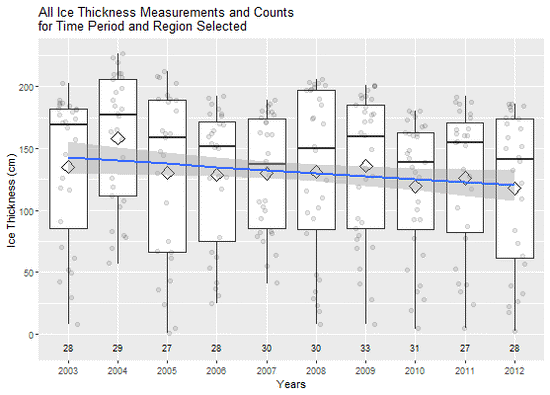
Coursera Developing Data Products assignment.

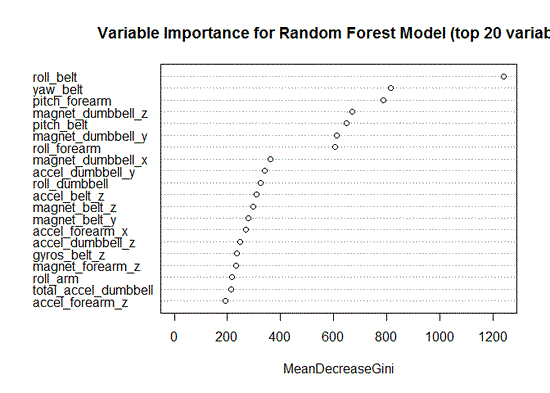
Coursera Practical Machine Learning assignment.